


نزدیکا
3.877.00 Reviews
App Specs
- Version
- 1.0.0
- Updated On
- License
- Free
- Downloads
- 500,000+
- Developer
- Menchu Castañeto Siring
- Categories
- Social
- Platform
- Android
Screenshots
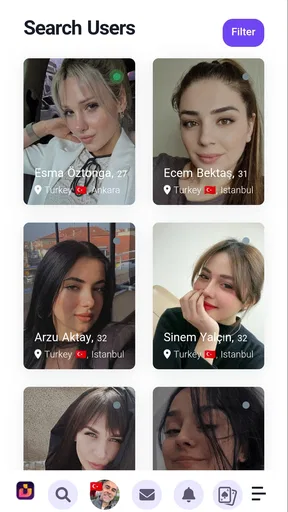


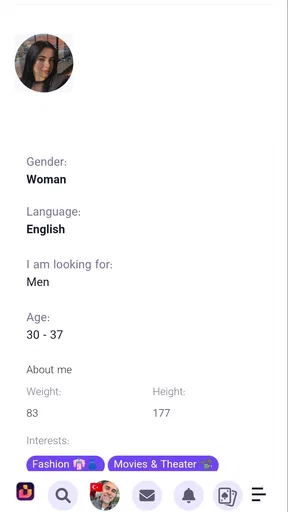
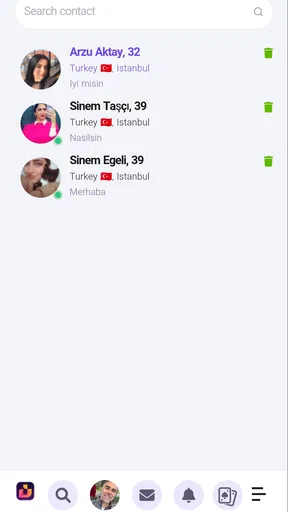
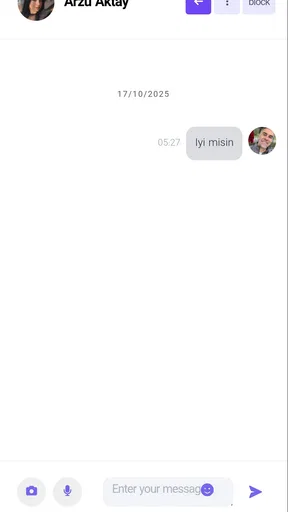
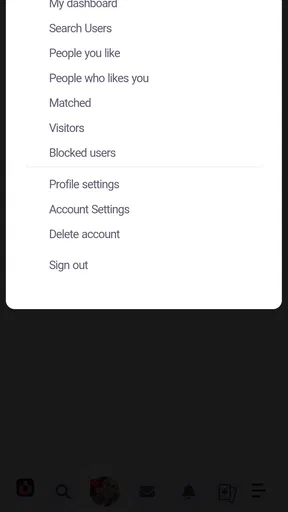
 Analysis by AppCompare
I approached نزدیکا as a social app built around getting into its newer experience, rather than as a platform I could understand from a polished feature list. That distinction matters. Its store summary focuses on registration and login, so the first question is not whether it can replace every social network I already use, but whether the path from opening the app to becoming an active participant feels clear enough to justify the effort.
My overall impression is mixed but useful: نزدیکا has the appeal of a focused social space, while its first-contact experience places a lot of weight on the sign-up and sign-in journey. If you are curious about joining a newer community and do not mind spending a little time getting oriented, it is worth exploring. If you expect an immediately familiar, highly polished alternative to the biggest social platforms, I would approach it with more patience.
From opening the app to becoming part of the community
I look at the opening stretch of نزدیکا as a test of whether a new social space gives me a clear reason to stay, not just whether I can get through sign-in. I’ll focus on how to make that first visit purposeful and how to avoid mistaking a quiet beginning for a broken one. From there, the next section turns to what changes when use becomes more frequent.
The starting condition: deciding whether a new social space is worth it
Most people open a social app with a simple goal. They may want to reconnect with someone, browse what is happening nearby, or find a place where conversations feel less scattered than on larger networks. نزدیکا presents itself in that context as a social application from Menchu Castañeto Siring, available free of charge and aimed at mature users. The mature rating is important because I would not treat this as an app for children or a casual family account.
The app has attracted more than half a million installs and holds an average rating of 3.8 from around two thousand ratings. Those figures suggest that it has reached a meaningful audience, but they also tell me not to confuse visibility with universal satisfaction. A social app can gather a large user base and still feel uneven depending on where you live, who you know, and how active the community is at the moment you join.
That is the first practical trade-off. The value of a social network depends on the people waiting on the other side of the login screen. If your friends, local contacts, or intended community are already using نزدیکا, the registration effort has a clear purpose. If you are arriving alone and hoping the app will instantly provide a lively feed, your experience may be less rewarding.
The first handoff: registration and login
The central workflow is straightforward in concept: open the app, register or sign in, and move toward the newer version of the نزدیکا experience. I found that this makes the entry point easy to understand, but it also means the quality of the first session depends heavily on how confidently you move through account access.
Worth Reading Before You Choose

EA SPORTS FC Mobile 26 Is a Bigger Football Game, but It Takes Time

Flipboard Shows What News Apps Must Do Beyond the Feed

Switching to Android Auto Means Rethinking Your Driving Routine

Google Calendar Makes a Crowded Week Easier to Manage

Ludo King Makes the Most of the Minutes Between Plans

Baby Panda World Brings Quick Play to Modern Phones, but Its Game Library Feels Busy
My advice is to treat registration as a deliberate setup step rather than something to rush through while distracted. Use an account detail you can reliably access, keep track of the information you choose during sign-up, and avoid creating a second account simply because the first login attempt feels slow or unfamiliar. That small habit prevents a common social-app problem: ending up with several half-finished profiles and no clear way to know which one is active.
The handoff from registration to actual use is where I would pay closest attention. A successful login should lead to a sense of arrival: you should know that the account is ready and understand what to do next. When a social app does not make that transition obvious, users can mistake an empty starting state for a technical problem. With نزدیکا, I would give the app a moment to settle, read each screen carefully, and avoid tapping repeatedly if the next step is not immediate.
This is also where the app differs from the usual alternatives. Large social networks often guide new users through a long sequence of recommendations, contacts, interests, and notifications. نزدیکا feels more centered on getting access to the service itself. That can be refreshing for someone who dislikes being pushed through an elaborate onboarding tour, but it can also leave a first-time user wanting more direction after signing in.
A practical step-by-step workflow
My recommended route is simple. First, decide what you want from the app before creating an account. Are you joining to look for people you already know, to investigate a local social space, or merely to see whether the community suits you? Having an answer changes how you judge the first session. A blank or quiet beginning is not necessarily a failure if your goal is to locate one specific group of people.
Second, complete the registration carefully. Since the app’s public positioning emphasizes registration and login, I would not treat this part as an obstacle to skip over. Read the prompts, confirm that you are entering the intended account details, and make a note of the route you used. If you later return after a long break, remembering whether you registered or were already signing in can save unnecessary confusion.
Third, once inside, pause before trying to do everything at once. Look for the app’s main social destination and work out how the service expects you to move from being a new account to an active participant. This is one of the less obvious lessons I took from using a focused social app: the best first action is often not posting. It is learning where your identity, conversations, and discovery tools are separated.
Fourth, test the flow with a low-stakes objective. Instead of immediately sharing something personal, try to find the person or social area that brought you there. This gives you a better sense of whether نزدیکا is useful for your particular purpose without exposing more information than necessary. If you cannot find a meaningful path after a reasonable exploration, that is valuable information too.
Finally, decide whether the app deserves a regular place in your routine. A social platform should earn that place by making return visits easy and purposeful. If every visit begins with uncertainty about where to go, the service may not fit your habits even if the basic account access works correctly.
The everyday scenario: joining for one person
Imagine that a friend tells you they have moved a conversation to نزدیکا. You install the app after work, register, and sign in. Your immediate outcome is not supposed to be a complete tour of every possible social function; it is reaching that person with as little friction as possible.
In that situation, I would keep the workflow narrow. Create the account, verify that you are in the correct profile, and focus on locating the intended contact or destination. Do not fill the session with unrelated personal details just because the app is new. Once the handoff is complete and you have reached the person or community you wanted, you can decide whether the wider experience is worth exploring.
This scenario highlights a genuine strength of a registration-focused entry point: it gives the user a clear reason to begin. It also exposes the weakness. If the person who invited you does not explain how to find them, the app may feel less welcoming than a mature network with strong search habits and familiar navigation patterns.
Handoffs between people, accounts, and expectations
Social apps are not used in isolation. One person recommends the app, another shares an account name or invitation, and the new user tries to reproduce that path. Every handoff can introduce friction. A misspelled identifier, a forgotten login method, or a vague instruction such as “just find me there” can make the app appear less usable than it really is.
When I recommend نزدیکا to someone, I would give them a precise starting instruction: install it, complete registration, sign in, and tell me when they reach the main social area. That is better than sending a long explanation based on assumptions. It also lets both people identify where the process diverges. Is the issue account access, finding the right person, or understanding what comes next? Separating those stages makes troubleshooting much easier.
Another useful habit is to keep your first interaction modest. A new social account does not need to reveal your entire identity immediately. Start with the minimum information needed to recognize you in the intended community, then expand only if the app and the people using it earn your trust. This is not a claim about a particular privacy control; it is simply sensible behavior whenever you enter a social space that is new to you.
The mature age classification reinforces that cautious approach. I would not hand the app to a younger family member as though it were a child-friendly messaging tool. Adults should also remember that an age label is not a substitute for personal judgment. Think about what you share, who can connect it to you, and whether a conversation belongs inside a social app at all.
What the result feels like after the setup
The result I look for is not just a completed login. It is a repeatable route from intention to interaction. If I can open the app, enter my account, understand where I am, and reach the people or social context I care about, then the app has done its most important job for me.
نزدیکا is most promising when you already have a reason to join. It can serve someone who has been directed there by a friend, a local contact, or an existing social circle. It may also suit users who prefer investigating a newer network without committing to the enormous, distracting ecosystem of the biggest platforms. The free price lowers the barrier to trying it, which is helpful when the real question is whether the community matches your needs.
At the same time, I would not call it an automatic replacement for established alternatives. A mature platform usually has stronger network effects: more of your contacts are already there, more people understand how to reach you, and more third-party advice exists when something feels confusing. نزدیکا has to be judged by the quality of the community you can actually reach, not by the convenience of downloading it.
The current version is 1.0.0, and the app supports Android 7.0 or later. That combination makes it accessible to many older Android devices, which is useful if you are not carrying a recent phone. It also gives me a reason to keep expectations measured. A first major release can offer a clean starting point, but users should be prepared for a less mature feel than they may find in long-established social products.
Where the flow breaks down
The biggest weakness is the possibility of a gap between “I have signed in” and “I know what to do now.” Registration and login are necessary, but they are not the whole social experience. If the app does not immediately connect a new user to a meaningful person or community, the first session can feel unfinished.
That problem is especially noticeable for people who join without an invitation. A user arriving alone may need clearer guidance about how to turn an account into a useful social presence. If your main expectation is a rich discovery system, broad public conversation, or the polished onboarding of a major competitor, نزدیکا may feel too narrow or too early in its development.
There is also a practical support burden on the person who invited you. In a familiar network, most users know the basic route from account creation to contact. In a newer or less familiar environment, the inviter may need to explain each handoff. That is not necessarily a flaw in the app’s core idea, but it changes the social cost of adoption. One enthusiastic user may bring friends in successfully; a casual recommendation may not be enough.
I would skip this app if you want a platform that already contains nearly everyone you know, if you need a mature and highly predictable social workflow, or if you dislike troubleshooting account access. I would also avoid treating it as a general-purpose replacement before checking whether the people you care about actually use it.
Who should try it, and who should wait
نزدیکا is a reasonable choice for adults who have a specific reason to join, enjoy trying emerging social spaces, or want a free way to follow a community that is already moving there. It is particularly suitable when the registration path has a clear destination waiting at the end: one contact, one group of people, or one conversation.
It is less suitable for someone who wants instant entertainment without setup, a guaranteed busy network, or a fully familiar alternative to the dominant social apps. In those cases, an established service may be better simply because your contacts and habits are already in place.
My most useful tip is to judge the app after completing one real workflow, not after staring at the opening screen. Register, sign in, reach the intended social destination, and return later to see whether that route remains understandable. A second visit tells you more than a first impression because it tests memory, continuity, and whether the app has become part of your routine.
My recommendation after following the full journey
I see نزدیکا as a social app with a clear entry theme but a result that depends strongly on the community and the purpose you bring to it. Its free access and broad Android compatibility make trying it easy, while the mature rating means adults should make the decision and use sensible care with personal information.
The app works best as a targeted bridge: someone points you toward it, you complete registration and login, and you arrive at a social interaction that gives the account a reason to exist. That workflow can be satisfying when the handoffs are clear. It becomes frustrating when you are expected to discover the entire path alone.
My honest recommendation is to try it when you have a concrete destination, not merely vague curiosity. Give the first session enough attention to understand the account journey, keep your initial sharing restrained, and compare the result with the networks you already use. If the people you want to reach are genuinely active there, the focused experience may be worth keeping; if not, the familiar alternative will probably remain more practical.
Pros
- Helps discover nearby services and places in one convenient app.
- Location-based results can make local searches faster and more relevant.
- Useful for finding options in unfamiliar neighborhoods.
- May support local businesses by increasing their online visibility.
- Simple concept that can save time compared with searching multiple platforms.
Cons
- Results may vary significantly depending on your city or region.
- Location access can raise privacy concerns for some users.
- Listings may be incomplete
- outdated
- or missing smaller businesses.
- Some features may depend on an active internet connection.
- The app may feel less useful in areas with limited local coverage.
FAQs for نزدیکا
What is نزدیکا and what can I use it for?
نزدیکا is a location-based social and discovery application designed to help users find nearby people, places, activities, or local content, depending on the features available in their region. After installing it, users can typically explore nearby listings, interact with local users, and discover information based on their location. The exact experience may vary according to city, language, account settings, and the app’s current version.
Does نزدیکا require access to my location?
Location access is generally important for نزدیکا because its main purpose is built around nearby recommendations, local discovery, or connections with people in the surrounding area. You may be able to deny permission or allow access only while using the app, but doing so can reduce the accuracy of results and limit certain functions. Review the permission request carefully before accepting it.
Is نزدیکا free to download and use?
نزدیکا may be available to download without an upfront charge, but some features can depend on optional purchases, advertising, subscriptions, or account-related limitations. Before using the service extensively, check the official Google Play Store or Apple App Store listing for the current pricing details. Also review any in-app purchase information, especially if the application is used by children or on a shared device.
Is نزدیکا safe for communicating with nearby users?
As with any location-based social app, users should be careful when communicating with people they do not know. Avoid sharing your home address, passwords, financial information, or other sensitive details, and use the app’s reporting or blocking tools whenever necessary. Keep in mind that location-based features can reveal more about your routine than expected, so review privacy settings before creating a public profile.
What should I check before downloading نزدیکا?
Before downloading نزدیکا, confirm that your Android or iPhone is compatible and that you have enough free storage space. Check the developer name, latest update date, required permissions, privacy policy, user reviews, and whether the app is officially available in your country. It is also worth verifying whether the interface supports your preferred language and whether its local content is useful in your city.


